
The Lumberjack


Students Serving The Cal Poly Humboldt Campus and Community Since 1929

Tag: canvas

  • Disorganized Canvas pages impede student learning

    Disorganized Canvas pages impede student learning

    by Oden Taylor

    It’s Friday afternoon. Your friends are going out tonight and you want to make sure you’ve completed all of your homework for the week. You check your Canvas “To-Do List” and see you’ve completed everything, so you decide to go out and party.

    The next morning, you get a notification on your phone: “Assignment Graded– 0/100.” The familiar rush of anxiety and dread fills you from your head to your toes, and you sink to the floor wondering, “How could this have happened?”

    If you can relate to this, you’re not alone. Navigating Canvas at Cal Poly Humboldt can be a real nightmare. Because there is no set standard for how professors’ Canvas pages must look, and Canvas training is not mandatory, many class Canvas pages are not designed in an efficient or accessible way.

    When I started my first term as a Cal Poly Humboldt student this semester I was shocked by the state of my various class Canvas pages. At the community college I attended previously, all Canvas pages were required to follow a very specific format that prioritized accessibility. 

    Professors had to complete mandatory training on how to properly use all the functions of Canvas, and had to have all of their lecture materials created before the semester started. Professors were required to ensure that their materials were accessible for students who are deaf, hard-of-hearing, or low vision. The way that Canvas pages are set up can also significantly impact students with learning disabilities or those that lack prior tech experience.

    Fortunately the solution to this problem has a simple fix. Professors should be paid to do mandatory Canvas training, and all Canvas pages should follow a clear set of accessibility guidelines.  

    To start, professors can upload all of their materials directly into Canvas before the semester starts. Students deserve a clear picture of what the semester looks like and should never be waiting on professors to upload their class materials. 

    Professors should be sure that all of their assignments show up in the To-Do List portion of Canvas with due dates. Making sure to use modules for each week’s assignments can also help to clarify expectations for students with regard to course pacing.

    Professors should hold themselves to the same standards that they expect of their students when creating class materials. Students can’t give feedback in the same way a professor can, which puts the impetus on the administration to survey students’ needs and make appropriate changes.

    Standardizing class Canvas pages will not only prevent frustration and missed assignments, it will also minimize the amount of confused emails teachers receive from their students. With a clearer understanding of what is being asked of them, students will do better in classes.

    Implementing these small changes works. I have seen it done, and it saves everyone a lot of trouble in the long run. Cal Poly Humboldt pays thousands of dollars per year for students and faculty to have access to Canvas—shouldn’t we use it properly?
  • 5 Apps to Help You Survive the Semester

    5 Apps to Help You Survive the Semester

    Survive the spring semester with these essential school apps

    There are five apps you should download this semester to help with organizing your school life and keeping your mind at ease. While not all of these apps are accessible on all types of phones, they’re typically compatible with phones that host Google Play or the Apple App Store.

    1) Google Drive

    The Google Drive app is one of the best apps you can use as a student. It hosts all of the accompanying Google Drive features like Google Sheets, Slides and Docs. You can download each app individually for more convenience, but thankfully they’re still accessible through the Drive.

    2) Canvas

    The Canvas app is helpful for doing assignments on the fly or for getting in touch with classmates for projects. Don’t turn off the notifications for this app because you could miss important class reminders from your professors. This app allows you to submit assignments from wherever you have a WiFi or data connection. It’s also compatible with Google Drive, which makes submitting assignments simple. You can check the to-do list to stay on top of your work and review the app calendar to see upcoming deadlines.

    3) The Transit App

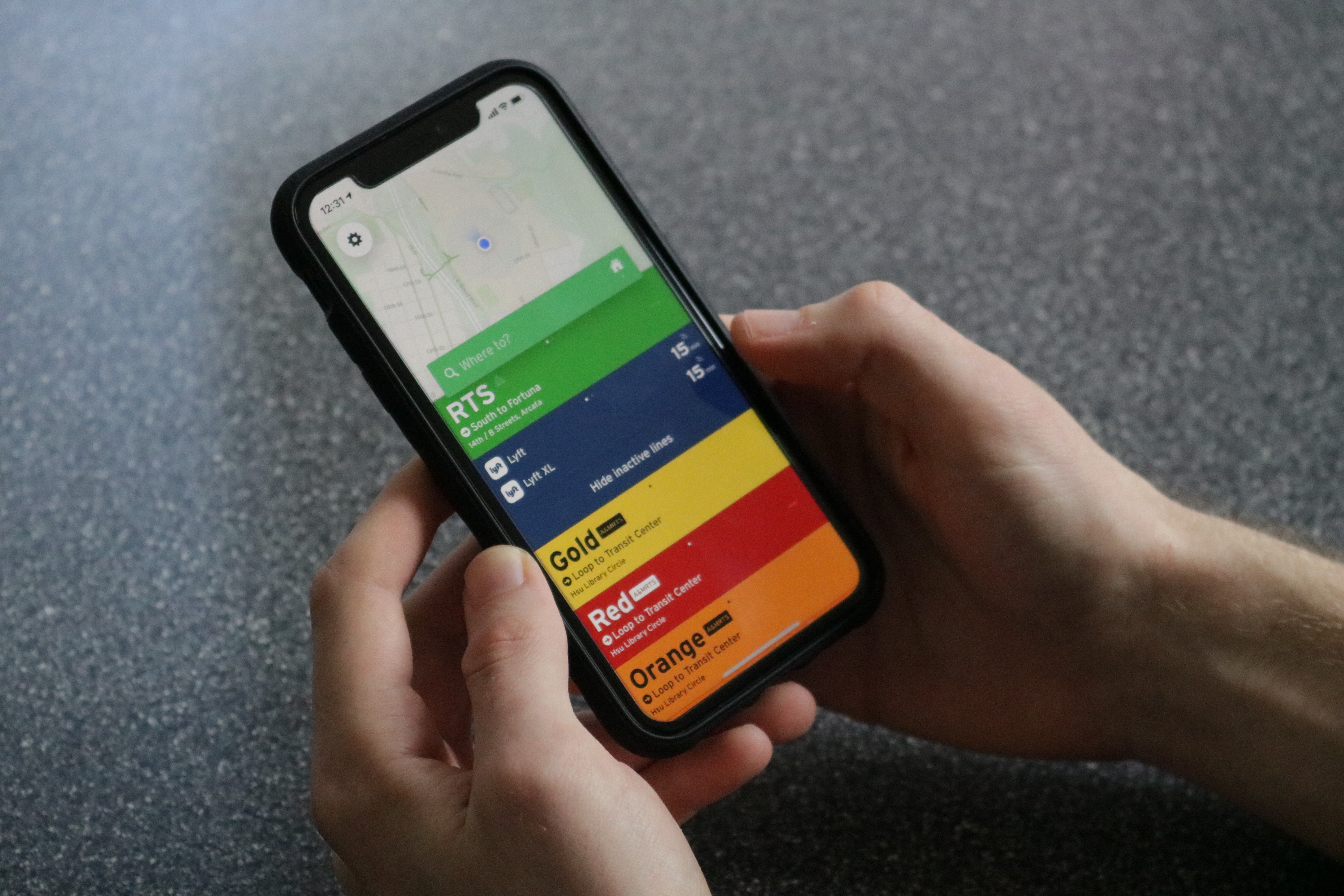
    The Transit app is essential for any student who commutes to campus. This free app will save you time and stress by showing you local transit routes, schedules and live updates. A helpful feature on this app is the ability to locate the closest route from wherever you are, as long as your GPS is on and active. Not only does the app display bus routes, but it also shows rideshares in the area like Lyft.

    4) Humboldt State Mobile:

    The Humboldt State Mobile app is a useful tool for checking the school directory, campus life events and other school-related information. You can register or drop classes, check your student center and browse semester class schedules. There’s even a campus map with marked locations for print kiosks and dining services. Although the app can be glitchy, it’s still a valuable and free resource that the school offers.

    5) Music streaming apps:

    According to a report on the neuroscience of music published by the United States National Library of Medicine, several studies found that listening to music can be therapeutic and may provide stress relief and improvements to cognitive function. Throwing on a study playlist might help you decompress while you review material. Check out Spotify, Pandora or SoundCloud for free music streaming services. Premium versions for music apps are also available if you wish to upgrade your music accessibility. The next time you sit down to study, turn on some tunes to help your cognitive functioning.

  • The Moodle to Canvas switch

    The Moodle to Canvas switch

    By | Sarahi Apaez

    Humboldt State University’s 11 year long relationship with Moodle is coming to a close with the introduction of a new learning management system. During the past few years issues have arisen with Moodle and Canvas is stepping in to bring some stable change.

    In an evaluation done in Spring 2016, HSU found many immediate benefits to switching to Canvas. No system is perfect but Canvas’ benefits include mobile support, not being down for several days at a time, saving grades as they’re entered, and cost.

    Susan Glassett Farrelly, the new director of academic technologies, would call the costs a trade-off. Canvas is cheaper by about $35,000 to operate and run every year according to HSU’s Canvas evaluation report.

    Canvas is a system run in the cloud, a key difference from Moodle which is run on hardware. With Moodle, more maintenance is required to install and support the hardware.

    “The real difference, is the technical manpower that is necessary to run Moodle,” said Farrelly.

    Since the start of this semester, Farrelly has been working to make sure everyone knows that our campus will no longer be supporting Moodle this coming Fall.

    It’s very hard to get the word out because HSU has a reputation of saying they will switch to Canvas but not following through.

    During this transition period from Moodle to Canvas, Information Technology, commonly known as IT,  is stretched very thin. The IT team are supporting both systems. According to Farrelly, they’re still looking for the exact percentage of Moodle and Canvas users on campus, but says it’s about half and half.

    Raul Romero, a humanities and international studies major, works in the Moodle/Canvas IT office on the third floor of the library. Romero is a student assistant doing double the work by supporting two systems at the same time. In Romero’s experience, learning these programs involves a lot of self-teaching and watching video tutorials. Romero says he loves his work but sometimes finds it to be chaotic.

    “It’s very difficult to convey what you see on the screen and turn that into words,” Romero said.

    Recently, Romero dealt with a call from an upset math professor who is having difficulties with a plug-in on Canvas that does not have the same features as it did on Moodle.
    “I thought, well, why doesn’t it work better and the bottom line is, it just doesn’t,” Romero said.   

    Before the decision to switch to Canvas was made, some members of the Math Department reported issues that are exclusive to their needs. This is an area that is still under development.

    When it comes to third party tools and plug-ins, the version for Canvas is not as diverse as the version for Moodle.

    “There’s really no way to break that to somebody without striking their nerve,” Romero said. “Especially as a student telling that to a professor who wants to give their students the best.”